Posts

Showing posts with the label AEM

Upgrading the AEM dispatcher module
Image
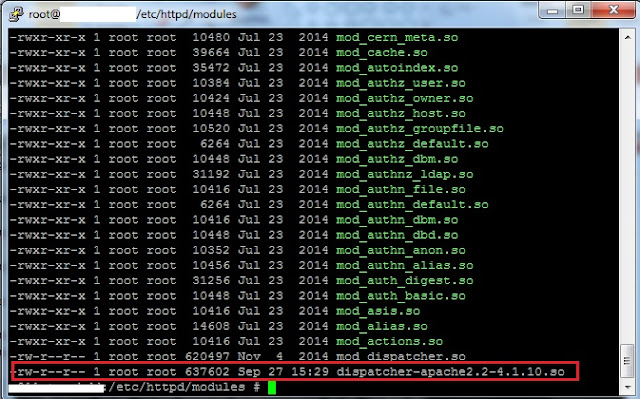
Upgrading the dispatcher module in AEM Often the AEM dev-ops team faces the challenge on Dispatcher upgradation. It is not clear anywhere how to do it and what precautions one should take while doing the same.  In this article we will cover these steps,  Upgrading the Dispatcher Module : Step 1 -  Download the required dispatcher module version from the  Adobe dispatcher download page  ,  Make sure you download the dispatcher version module as per the OS. https://experienceleague.adobe.com/docs/experience-manager-dispatcher/using/getting-started/release-notes.html?lang=en Step 2 -  Extract the dispatcher module at some location on server or local machine.                      tar -xvzf <dispatcher-xxxxxxxx.tar.gz> (linux)  Step 3 -  Copy the extracted dispatcher-xxxxxxxxxx.so file to the module folder of the server.       ...

Managing AEM Repository Size Growth ?

Image
 Managing AEM Repository Size Growth Managing your AEM repository size growth can be challenging for numerous reasons. What’s more, it may suddenly start to grow unexpectedly and fill up space in the assigned drive of your AEM application. In this post, I want to share a few AEM utilities & methods which can help you to not only manage the AEM repository size but also help to improve the AEM application performance. 1: Tar Compaction (also known as Revision Cleanup) By running the regular tar compaction, you can not only control the AEM repository size growth, but it will also help improve the AEM application performance. Tar compaction reclaims the disk space by removing the obsolete/redundant data from your AEM application. You can use both online and offline compaction. You can schedule online Tar compaction during weekdays after business hours & offline compaction on weekends (Non-business hours or during your designated Maintenance Window). 2: Garbage Collection By run...

How to WhiteList IP through AEM Dispatcher ?

Image
The dispatcher is used as a load balancing/caching tool by AEM. It can also be used to block anyone from accessing your AEM author instance. This is to ensure that no one outside the client’s network can access it. AEM Author and publisher should never be exposed directly. In most cases, clients may also require a block to be put on AEM pub dispatchers before going live. This is to ensure that no one can see the site except for the client so performance, penetration, and UAT testing can be performed before going live. In this article, we will see, 5 easy steps to enable IP whitelisting in Apache so only the allowed list of IPs have access to AEM through the dispatcher. 1) In Apache to enable whitelisting, the Require directive is used which is provided by the mod_authz_host module. Make sure that you have the module enabled first in  /dispatcher/src/conf.modules.do/00-base.conf LoadModule authz_host_module modules/mod_authz_host.so 2) In the ams default variable file /dispatcher/s...

curl command AEM package filter addition creation

Image
How to create AEM package via CURL  Most of our dev ops and AEM developers face issue while automating the AEM package creation via Curl.  I will explain the command and process for it.  in AEM package creation is a 3 steps process.  1- AEM package creation  2 - Filter addition  3- Package build Let's see all these 3 steps in detail -  AEM package creation  it is simple step -  curl -u admin:admin -X POST http://localhost:4502/crx/packmgr/service/.json/etc/packages/my_packages/testpackage?cmd=create \ -d packageName=testpackage \ -d groupName=my_packages Filter Addition  This is a complex step where you need to be careful while adding the parameters.  General command , in this " /content/my-site" is my package filter. You can also define the rule like exclude in exclude section.  curl -u admin:admin -X POST http://localhost:4502/crx/packmgr/update.jsp \ -F path=/etc/packages/my_packages/testpackage.zip -F packageName=testpack...

How to Increase Apache Request Per Second ?

Image
How to Increase Apache Request Per Second ? By default, Apache web server is configured to support 160 requests per second. As your website traffic increases, Apache will start dropping additional requests and this will spoil customer experience.  Here’s how to increase Apache requests per second. 1. Install MPM module We need to install MPM Apache module to be able to increase Apache requests per second. You can use mpm_worker or mpm_event module for this, instead of mpm_prefork module which consumes a lot of memory. You can easily install MPM module in Apache with following command For CentOS7/RHEL7 : Adjust /etc/httpd/conf.modules.d/00-mpm.conf Comment the line LoadModule mpm_prefork_module modules/mod_mpm_prefork.so by adding # in front of it. Uncomment the line LoadModule mpm_worker_module modules/mod_mpm_worker.so by removing # in front of it. For Ubuntu/Debian :  Use a2dismod / a2enmod to disable mpm_prefork and enable mpm_worker 2. Increase Max Connections in Apach...

AEM ACL and how they are evaluated

Image
ACL's and how they are evaluated ? AEM Developers, Infrastructure Engineers / Dev-ops teams working in any domain regularly come across a challenge for understanding the ACL & its evaluation mechanism.  Adobe Experience Manager is designed to cater for content authoring of multiple sites by multiple content authors. Naturally, this process needs to be controlled by strict Access Control Lists (ACLs) to manage. AEM WCM uses Access Control Lists (ACLs) to organise the permissions being applied to the various pages. This article addresses in a simple way on how to understand the ACL's , its different ways,  This article covers the following - How can we read and understand the ACL.  Evaluation of user permissions.  Concurrent Permission on ACL Access Control Lists are made up of the individual permissions and are used to determine the order in which these permissions are actually applied. The list is formed according to the hierarchy of the pages under consideration...

How Does S3 works with AEM ?

Image
How Does S3 works with AEM  ? Accommodating a huge amount of assets in any content management platform is challenging. Adobe Experience Manager offers an integration with the Amazon S3 storage solution, allowing binary data for images, documents and videos to be stored in an S3 bucket. Amazon S3 is highly performant and offers nearly infinite storage capacity.   When talking about terabyte storage, performance is everything. The choices made during the planning and architecting phase can literally make or break the performance of a CMS system and the websites running on it.  Adobe Experience Manager offers a number of storage methods, each offering a different way of storing data. Each of these options has its strengths and weaknesses. In AEM storage the mechanisms are called Micro Kernels, or MK for short.  In this article we will look at the AEM with S3 data store. For the detailed steps for S3 configuration you can refer -  https://www.aemrules.com/...

Build is failing due to CHECKSUM issue.

Image
 Maven build is failing due to CHECKSUM issue.  AEM Developers, Infrastructure Engineers regularly come across a challenge on building the AEM code & dispatcher module use to get failed while mvn build. The article addresses in a simple way on how to understand the mechanisms of dispatcher module build, and gives a detailed explanation of how it can be resolved.  This is useful for  building the code for a deployment via Pipeline either it is Adobe Cloud manager or Jenkins, you can see this error while your local build itself.  This error is caused, as the dispatcher owner does not not want you to change/modify few of its default files which are marked as immutable in dispatcher server.  You can find full list of immutable files on of dispatcher provided by Adobe.  https://helpx.adobe.com/experience-manager/kb/ams-dispatcher-manual/immutable-files.html Issue :- In AEM while doing the deployment it is being seen , user get the exception , Maven ma...

Replication : PKIX path building failed:

Image
 SSL handshake error while replication  While configuring the SSL between author and publish servers, for a secured data flow you want to make the replication calls also over HTTPS.  Assumption -      Author and publish servers will have working SSL and sling security check should be pass.  Error -   Replication test  failed PKIX path building failed: sun.security.provider.certpath.SunCertPathBuilderException: unable to find valid certification path to requested target Cause -  This issue comes as replication agents try to find the certificates with exact name. and it ignores the wild card certificates.  Solution  -  Login to AEM , open replication agent which has the error. Edit the replication agent Go to transport  Make ssl to R elaxed . 

OakAccess0000: Access denied

Image
ERROR :-   OakAccess0000: Access denied We often observe while doing the AEM development or in live running environment we get the error code  OakAccess0000 , while running a workflow or any asset upload.  This impact the business as content author are unable to upload any content.  Error stack trace :- Javax.jcr.AccessDeniedException: OakAccess0000: Access denied  at org.apache.jackrabbit.oak.api.CommitFailedException.asRepositoryException(CommitFailedException.java:232) [org.apache.jackrabbit.oak-api:1.10.6]  at org.apache.jackrabbit.oak.api.CommitFailedException.asRepositoryException(CommitFailedException.java:213) [org.apache.jackrabbit.oak-api:1.10.6]  at org.apache.jackrabbit.oak.jcr.delegate.SessionDelegate.newRepositoryException(SessionDelegate.java:669) [org.apache.jackrabbit.oak-jcr:1.10.6]  at org.apache.jackrabbit.oak.jcr.delegate.SessionDelegate.save(SessionDelegate.java:495) [org.apache.jackrabbit.oak-jcr:1.10.6]  at org.ap...

Configure/Decoding AEM AuditLogs

Image
AEM Developers, Infrastructure Engineers / Dev-ops teams working in the financial domain regularly come across a challenge for event auditing in AEM. This helps in identifying most of the activities happening in AEM. Audit logs are a very effective way to debug the content issue & to know what all is happening in your environment and by whom. This article addresses in a simple way on how to enable the audit logs, its different ways, and how to understand the audit logs.  This article covers the following - How can we enable Audit logs in AEM. How can we read and understand the Audit logs/ tools to use it. Audit log on file system in crx-quickstart/logs folder.   Audit logs for User creation / Modification. How can you archive/purge the audit logs. How can we enable Audit logs in AEM?            By Default, the Audit logs are pre-configured in AEM, for a few basic operations of DAM and for all other operations of Pages and replications activity...